

FAQ about Adam DU
- 1.
- I have a licenced copy of Adam DU & it has suddenly stopped working - its telling me my evaluation period has expired?
OR
- I have just purchased/activated Adam DU but it still says I am using an evaluation version
OR
- I get a warning message of "A Licence file has been found in the Adam DU program folder but it does not match the licence key displayed below"
- I have a licenced copy of Adam DU & it has suddenly stopped working - its telling me my evaluation period has expired?
-
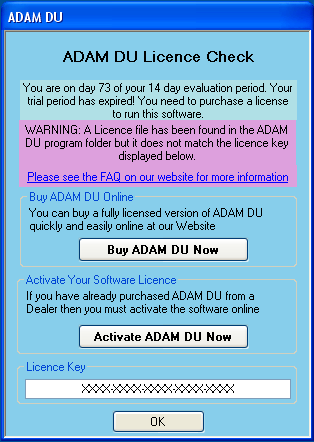
You might see a message window similar to this. The purple area explains that the licence file is not valid, as it does not match your licence key. This may have occurred because of 3 reasons:
- You have changed some main hardware components in your computer since you licensed/activated Adam DU.
- You incorrectly entered your licence key into the Adam DU website whilst activating or purchasing Adam DU.
- The license file has not been correctly saved to the Adam DU program folder. The license file that is emailed to you must be saved with EXACTLY the same name as it is in the email to the Adam DU folder - do not change the name or the file type extension of the license file.
The licence key is tied into the main hardware components of your computer (to stop illegal software copying).
If the main hardware components of your computer change then the Licence key will also change, thus it does not match licence file we issued to you.
Please contact us via our website support page for assistance in obtaining a new licence from www.adamdu.com
- 2. My Balance/Scale is not mentioned in the List of Supported Models by Adam DU.
-
If you have recently purchased a new Adam balance/scale that has an RS-232 port and it is not listed in the Supported Models then please visit Adam DU Website as a newer version of Adam DU will be most likely available for download that will contain support for current models. Just install the newer version of Adam DU over your old version to benefit from the latest software. If you still cannot see the your Model listed on the website, then please use the Contact Us form on the website to enquire further.
- 3. Can I get software updates/upgrades for free?
-
Adam Equipment may provide free software updates for your version of Adam DU at our discretion, as per the Licence agreement. See the download page on the Adam DU Website for more information on the latest updates for Adam DU & the changes from previous updates. If there is a newer update available then you can simply download it and install it on your computer. It will automatically upgrade your current version.
- 4. Can we connect 8 or 16 scales to the Adam DU?
-
Adam DU will support 8 scales/balances simultaneously connected - they can be either all the same type or mixed models. If you want to collect data from 16 balances for example then you would need to purchase two licences of Adam DU & run them on two different computers as you can only run one copy of Adam DU on a single PC.
- 5. Can we manually print from the scale or use a timer?
-
You can get Adam DU to collect data for you from the scale using an inbuilt timer - which you can schedule to poll the scale/balance from a minimum of every 1 second or you can physically press the print button on the scale to send the reading.
- 6. Can I use a desktop printer connected to the PC to print the results from Adam DU?
-
You can print the data collected in Adam DU to a PC printer or export it to MS Excel/MS Word or a file etc at any time to print from another application - though you cannot currently set Adam DU to auto print the raw data collected from the scale each time a reading is received.
- 7. I am having problems importing a CSV file for auto populating a custom field with values in Adam DU.
- The CSV file must be comma separated and the fields must be speech mark delimited too for it to work.. See the example below:
"10284934","13067229","13068034","12378932"
So there should be no carriage return/line feeds in the data. So the text is in one long line.
- 8. Can I use a barcode reader with Adam DU.
-
Adam DU does not directly support/use barcode readers but it is common practice that windows compatible barcode readers have software the comes with them that allow you to insert a barcode reading into any field in any windows application that has the user focus.
So you could for instance use a custom field in a session, pre-load it options form a CSV file and then use a barcode scanner to scan a label and insert the value into the custom field and check it against the drop down list of options...